

|
ATS > Software > Excel 2002 and 2000 Differences |
|
|
|
||
|
||||
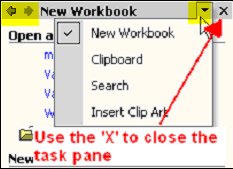
How is Excel 2002 different from Excel 2000?Excel 2002 and 2000 Differences | Major New Features | Minor New Features | Similarities | What's Missing in Excel 2002Excel 2002 is a minor upgrade to Excel 2000. The program is the same with a few new features and a slightly different look. You will not need to relearn Microsoft Excel or sacrifice the ability to share files with users who have older versions. Excel 2000 can use Excel 2002 workbooks. Major new features in Excel 2002Task PanesWord, PowerPoint, and Excel now include task panes. Task panes group common tasks into panels on the side of the application window. When you open Excel 2002, the new document task pane gives you the option to open an existing workbook, create a blank workbook, or create a workbook from a template. Other task panes are available. You can toggle between all available task panes by using arrows as shown below or close them by clicking the X.
The new document task pane remains onscreen until you close it or select a different task pane. You can stop task panes from automatically appearing by going to the tools menu, selecting options, clicking the view tab, and making sure startup task pane is unchecked. Task panes are available through the view menu if you ever want to see one. Smart TagsSmart tags recognize content and actions as you work in Excel 2002 and Word 2002. You will see smart tags when you paste data, enter an incorrect formula, or fill series.
As you work with Excel 2002, you may notice other smart tags. For instance, Excel will recognize some stock symbols typed in capital letters (try typing MSFT). If you dislike smart tags, you can disable them altogether. To disable smart tags, go to the Tools menu, and click Autocorrect options and click the smart tags tab. The last step is to click remove smart tags. After you remove smart tags from a workbook, you cannot re-enable them. Help System EnhancementsMicrosoft has made the help system available directly from the toolbar. This means that you can type a question or keywords directly into the help textbox on the toolbar.
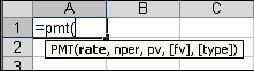
Function ScreentipsWhen Excel recognizes that you are building a formula using a function, instructions appear in a yellow box beneath the active cell. This feature often saves a trip through the help system.
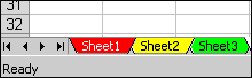
Note: The function wizard has moved next to the formula bar. It now offers a direct link into the help system for each function. Minor Improvements in Excel 2002Link ManagementThe link management system available through the edit menu is much improved. Excel 2002 now lists the external links and gives you the opportunity to change file locations after you move files. This is a huge improvement if you do a lot of external linking. New Language FeaturesYou can now edit Asian language spreadsheets in the English language version of Excel. Excel 2002 also contains additional international number formats. Color Coded Worksheet TabsYou can now assign colors to each worksheet tab.
Workbook EncryptionYou now have the option to save data files with strong encryption. Be sure not to lose your password if you use this feature. If you forget the password, it will be impossible to use the file. In addition, files saved uses the new encryption features will not work with previous versions of Word. Similiarities Between Excel 2002 and 2000File FormatExcel 2002 and Excel 2000 use the same file format. However, if you encrypt spreadsheets using Excel 2002, you will not be able to open them with Excel 2000. Macros Still WorkMicrosoft reports that macros created with Excel 2000 should continue to work with Excel 2002. However, by default unsigned macros will not run. What is Missing From Excel 2002?
|
|
|